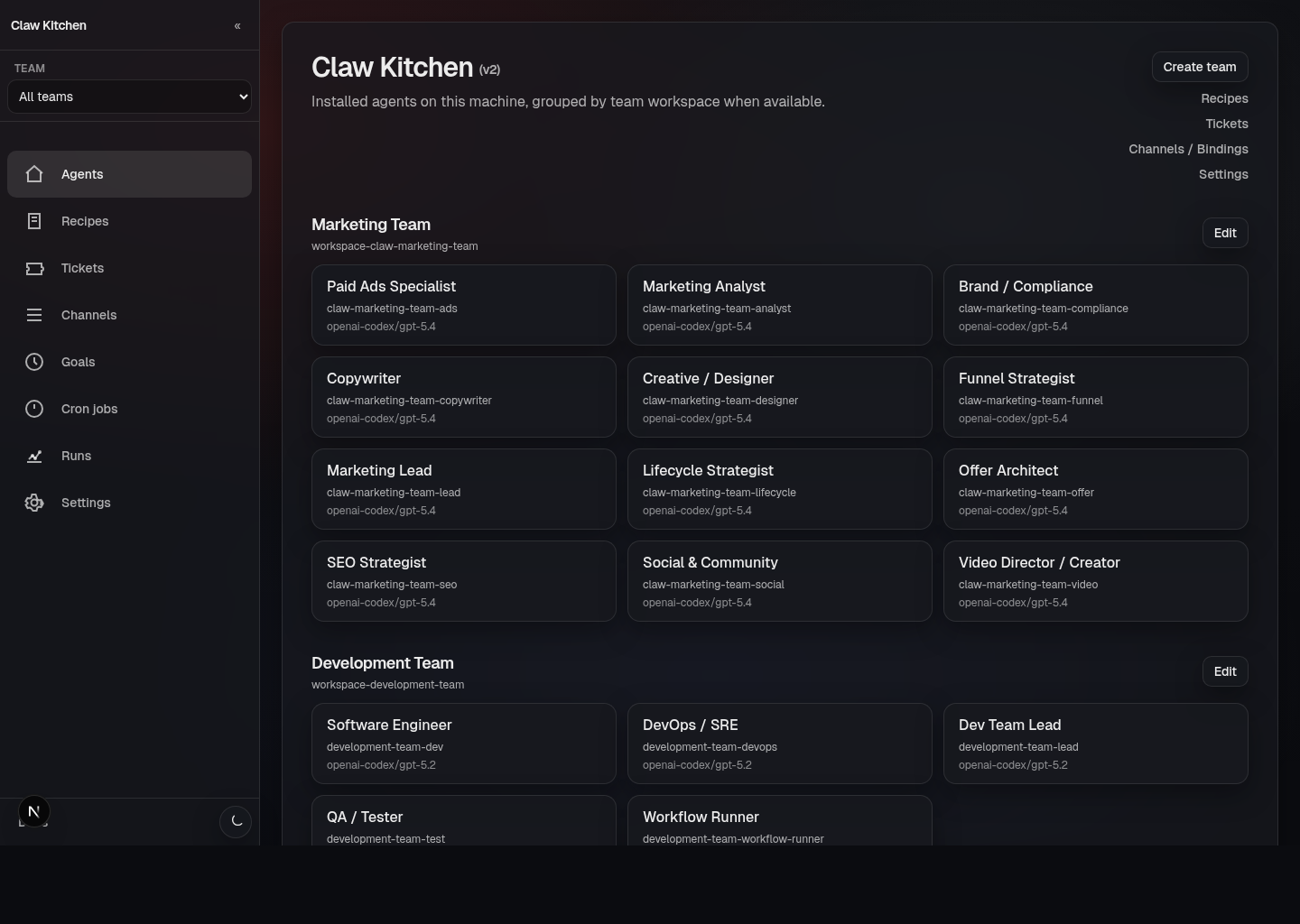
What ClawKitchen is
ClawKitchen is the local-first UI for operating a machine that runs OpenClaw and ClawRecipes. It takes the parts of the system that would otherwise be scattered across terminal commands, workspace folders, config files, and markdown documents, and gives you one place to inspect and operate them. In practice, ClawKitchen is where you go to:- see which agents are installed on this machine
- scaffold new agents and teams from recipes
- inspect and edit team files, skills, workflows, and cron jobs
- follow workflow runs and approvals
- work with file-backed tickets and goals
- manage message-channel bindings and a few key runtime behaviors
Why it exists
ClawRecipes and OpenClaw are powerful because they are file-first and scriptable. That is a feature, not a bug. But it also means the day-to-day operator experience can get rough fast. Once you have multiple agents, multiple teams, scheduled jobs, workflow runs, approvals, and tickets, the system becomes harder to understand at a glance. ClawKitchen exists to make that operational layer easier to work with without replacing the file-first model underneath it. It is not meant to be a separate hosted backend with a mystery database. It is the dashboard for the machine and workspaces you already own.How it relates to ClawRecipes
A useful mental model is:- OpenClaw runs agents, tools, channels, sessions, and automation
- ClawRecipes defines reusable recipes for agents and teams
- ClawKitchen is the UI for browsing, scaffolding, editing, and operating those systems
What you can do in ClawKitchen
The product currently gives you a real operations surface for:- Home / Agents — view installed agents grouped by workspace/team
- Recipes — scaffold agents or teams from builtin and custom recipes
- Teams — manage team structure, files, skills, cron, workflows, memory, and orchestrator visibility
- Workflows — create and edit file-first workflow definitions
- Runs — inspect workflow runs, statuses, approvals, and details
- Tickets — manage file-backed work items across backlog, in-progress, testing, and done
- Channels — manage messaging bindings/config
- Goals — create and track durable goals tied to teams
- Cron jobs — inspect and manage scheduled jobs
- Settings — control a small set of operational behavior like cron installation mode
The design philosophy
ClawKitchen is built around a few principles:- local-first — it reflects the machine and workspaces you already have
- file-backed — the source of truth stays in files/config whenever possible
- operational — it is meant to help you run teams, not just admire them
- human-readable — it should make agent systems easier to inspect and understand
Who ClawKitchen is for
ClawKitchen is most useful for people who are:- actively running one or more ClawRecipes-powered teams
- iterating on recipes and workflows
- reviewing runs and approvals
- managing file-backed operational state through a UI instead of only through the terminal